 Dansk
Dansk
 Deutsch
 Español
 Français
 Italiano
 Norsk
Norsk
 Polski
 Português
 Suomi
Suomi
 Svenska
How to upgrade your subscription
Art. no. 216070499
You can upgrade the subscription yourself whenever you want. It's quick and easy and can be done directly in the shop.
Upgrade from GO to PLUS, or GO/PLUS to PRO.
Here's what you do:
1) Log in as usual (must be done by the shop owner)
2) Click on your name in the top right corner
3) Click on My subscription
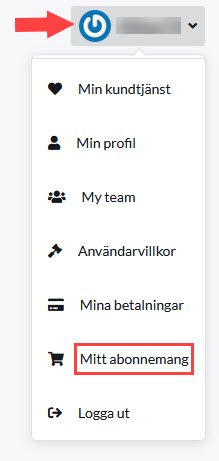
4) Click Switch to this package for the subscription you want to switch to. When a green box appears around the package, you have selected it:

5) Go to the bottom of the page and select Proceed to payment

6) Extend as usual by choosing card or invoice*
*You now pay the difference between e.g. PLUS & PRO, and only for the period, you have left of your current subscription.
Done!
To downgrade a subscription, i.e. change from e.g. PLUS to GO, please contact customer service.
If you have problems renewing a subscription, check that your profile contains both company name and VAT number, then try again.
 with Abicart